Users
ContentContainer
A humhub\modules\content\models\ContentContainer|ContentContainer in HumHub is the base concept for assigning content entries to a specific container instance (user or space).
Each humhub\modules\content\models\ContentContainer|ContentContainer is assigned with an unique guid, which is used in controllers to identify the context of its actions.
Currently there are two types of ContentContainer:
humhub\modules\user\models\User|Userhumhub\modules\space\models\Space|Space
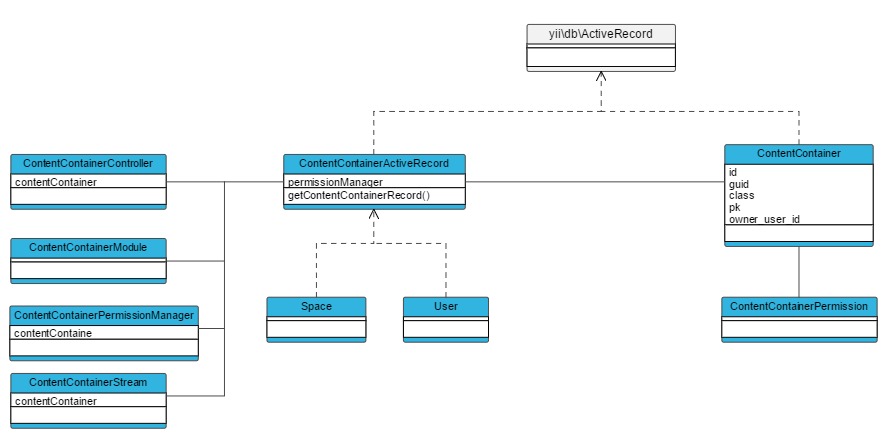
Note: It's not possible to create own ContentContainer classes, yet.
ContentContainerController
The humhub\modules\content\components\ContentContainerController|ContentContainerController class is extended by controllers working in the context of a specific humhub\modules\content\models\ContentContainer|ContentContainer.
A humhub\modules\content\components\ContentContainerController|ContentContainerController will automatically search for a sguid (Space) or uguid (User) request parameter in every request and will instantiate the corresponding humhub\modules\content\models\ContentContainer|ContentContainer.
The humhub\modules\content\components\ContentContainerController|ContentContainerController provides common tasks like:
- Automatic container loading based on URL
- Access checks
- Layout selection based on container type (User or Space)
- Create URL's for the given ContentContainer
For example:
class ExampleController extends \humhub\modules\content\components\ContentContainerController
{
    public function actionIndex()
    {
        if ($this->contentContainer instanceof Space) {
            //Space related stuff...
        }
    }
}
Url's pointing to a ContentContainer action should be created by using the createUrl() function
of your ContentContainer instance. This will add the required sguid or uguid to your request.
 // Direct ContentContainer call
 $space->createUrl('/module/controller/action');

 // Within a ContentContainerController:
 $this->contentContainer->createUrl('/module/controller/action');
Note: Requests for a
humhub\modules\content\components\ContentContainerController|ContentContainerControlleraction without providing a sguid or uguid parameter will fail!
ContentContainerActiveRecord
Each ContentContainer class is derived from \humhub\modules\content\components\ContentContainerActiveRecord.
Beside others, this abstract class provides the following functionality:
- Permission Management
getPermissionManager() - Profile-/Banner-image access
getProfileImage(),getProfileBannerImage() - Rendering the container stream
getWallOut()(see Permission Management)
Profile image example:
//Get Profile Image Url
$profileImage = $space->getProfileImage();
if($profileImage->hasImage()) {
    $url = $profileImage->getUrl();
}
ContentContainerModule
If a module should appear in the content containers module section, the module class must extend humhub\modules\content\components\ContentContainerModule.
A ContentContainerModule can be enabled or disabled for a specific ContentContainer. The calendar module, for example, can be enabled for a specific space or a specific user account.
See the humhub\modules\content\components\ContentContainerModule class for a full list of options.
Example of a modules Module.php file:
class Module extends \humhub\modules\content\components\ContentContainerModule
{

    // Defines for which content container type this module is appropriate
    public function getContentContainerTypes()
    {
        // This content container can be assigned to Spaces and User
        return [
            Space::className(),
            User::className(),
        ];
    }

    // Is called when the whole module is disabled
    public function disable()
    {
        // Clear all Module data and call parent disable
        parent::disable();
    }

    // Is called when the module is disabled on a specific container
    public function disableContentContainer(ContentContainerActiveRecord $container)
    {
        parent::disableContentContainer($container);
        //Here you can clear all data related to the given container
    }

    // Can be used to define a specific description text for different container types
    public function getContentContainerDescription(ContentContainerActiveRecord $container)
    {
        if ($container instanceof Space) {
            return Yii::t('MyModule.base', 'Description related to spaces.');
        } elseif ($container instanceof User) {
            return Yii::t('MyModule.base', 'Description related to user.');
        }
    }
Note: If you're working with content or other persistent data, make sure to delete container related data when the module is disabled on a contentcontainer. This can be archieved by overwriting the
humhub\modules\content\components\ContentContainerModule::disableContentContainerfunction.
Content
TBD
ContentActiveRecord
Each Content ActiveRecord (derived from \humhub\modules\content\components\ContentActiveRecord) is automatically linked to a humhub\modules\content\models\Content record via the content attribute.
This Content record holds all neccessary information and provides common methods:
- ContentContainer which the Content belongs to
- Meta Information (created_at, created_by, updated_at, updated_by)
- Wall Assignments / Methods
- Archiving / Pinning
- And more...
If you're implementing an ActiveRecord based on humhub\modules\content\components\ContentContainerActiveRecord you need to implement the following abstract methods:
getContentName()- Returns the displayed name of the Content (e.g. Post or Poll)getContentDescription()- Returns a preview of the Content - which is used in Notifications for example.
Example:
(TBD)
Wall/Stream Output
(TBD)
Querying Content
If you're calling find() on a \humhub\modules\content\components\ContentActiveRecord instance you'll get a special \humhub\modules\content\components\ActiveQueryContent which provides additional methods to select content.
- contentContainer($container) - Find content only inside a given container
- readable($user) - Return only user readable content
- ...
Controller
TBD
ContentAddon
TBD
- Always linked to particual Content, inherits access rules from it
- Examples: Like, File, Comment
- Can be nested (e.g. Container -> Content -> Addon (Comment) -> Addon (Like)
ActiveRecord
TBD
Provides access to the related content via *content *Attribute
Controller
TBD